
Someone mentioned that the photo uploads to Flickr from Raven+ is broken (here and here). Looks like it is not. Here is an excerpt from the log for this blog post for my Flickr upload for the picture above:
I thought I hit a dead-end when I couldn't find any Python API libraries for uploading my images to Google Photos via Raven+.
But a couple of hour search later via Google for "Google Photos Python Uploads" lead me to this:

Google's Blogger calls it a "jump break". But Raven/Raven+ calls it an "Extended Entry Marker". What it does, anyway, is to show a summary of your blog post at your Blogger blog's homepage, while providing a link, "Read more >>", to your entire post, which your audience can read in its entirety if s/he so desires.

I always include a "jump break" in every one of my blog post. Problem is, I always do it as the last thing after composing my post (sometimes even after publishing it) mostly because of my absentmindedness.
There is this problem with the Raven/Raven+ editor - it does not enabled the 'Save' button (if it was disabled previously) after inserting a "jump break"/"Extended Entry Marker". This is rather annoying as I then have to insert a 'junk' character to enable the 'Save' button, then delete this 'junk' character before saving my now modified post. A prime target for getting this bug fixed here.
There is this problem with us programmers. We will not complain and will happily chug along when confronted with the toughest programming challenge ever. But when it comes to documenting our work, we will make excuses, drag our feet and create various alibi. I remember this joke that I've heard about programmers some 20 years ago:
"if it is so hard to write, it must be even harder to describe"
Yes, we programmers understand this perfectly. But still there should be no excuses for not documenting one's work; and this is something that I should bear in mind - always.
Unfortunately, I do get sloppy sometimes. Case in point:
I briefly mentioned that I might be integrating the "Google API Client Library for Python version 1.2" into RavenPlus some 11 months ago. Well in the end, I actually did.
Problem is now I can't remember why I made this decision. I can faintly recall problems I had between 'py2exe' and the newly installed libraries needed for Google OAuth2 authentication (most of them is installed, by default, in the '.egg' format).
Is this the main reason? I can't remember. If only I have written the reason down earlier - somewhere.

Integrating the Google API Client Library for Python into RavenPlus is rather simple. All I did was to bung it under the blog publishing sub-system of RavenPlus at 'zoundry/blogpub'. Naming the new directory as 'blogger' seems appropriate and all Google Blogger's OAuth2 related modifications in RavenPlus (by me) are placed here and below its sub-directories; and this includes the picture uploading capabilities to Google's PicasaWeb ('zoundry/blogpub/blogger/gdataExtend' is where the modified gdata API resides).
The directories 'apiclient', 'oauth2client' and 'uritemplate', circled in RED in the picture above, are from the Google API Client Library itself. As mentioned previously, I only used a subset of this Client Library from Google.
Without going into details, I briefly mentioned that I added a few new functions into the class GDataService and PhotoService in order to get the interfacing between 'Google GData Photo API' and RavenPlus working with Google OAuth2 authentication.
Here are the technical details, plus the Python code.
As this is a rather long post, I have broken it down into two parts. In this post, I will only discuss the changes that I have made to the gdata library. In a future blog post, I will show how I used this customised gdata library for uploading pictures to Google's PicasaWeb from RavenPlus.
Since Python is an object-oriented programming language, the most obvious way to customised gdata is via 'inheritance'. I tried and failed because of some local private variables being referenced in the base class from my derived class. Like I have said before, I am no expert in Python. In desperation, I used what seems to be the easiest way out: I made local copies of what's needed from gdata and customised them to fit my requirements. The important thing here is it works.

I hope somebody will find this Python script useful. I actually used this Python script to test things out first (and make sure that everything works) before I started work on fixing RavenPlus last year. I can't remember now, but I think the gist of this script came off from b.py - a Python script for posting blog posts to Blogger and Wordpress.
To post to your blog from this script, remember to replace the blogID "1087XXX5764091XXX95" in the line
post = service.posts().insert(blogId="1087XXX5764091XXX95", body=body, isDraft=False).execute(credentials.authorize(Http()))
with your blog's blogID.
To update an existing blog post, just replace the line above with the following (NOTE: you will need to find out what your blog post postID is, otherwise the statement will fail):
post = service.posts().update(blogId="1087XXX5764091XXX95", postId="4781959859649019078", body=body, publish=True).execute(credentials.authorize(Http()))
The OAuth2 login credentials is named 'plus.dat' and it must be located in the same directory as this Python script file.
I ran this script file under Python 2.4 with some customisation made to the Google API Python Client Library Version 1.2.
Below is the code for my first Google OAuth2 Python program. The last time I had a look at it was something like 6 months ago - that long already? As I recall, the sample script file blogger.py that was bundled in 'google-api-python-client-samples-1.2.zip', if I am not mistaken, by Google didn't work. I had to debug it myself to get it working.
What this program does is to print out the user's Google login name, the list of blogs at Blogger.com that is associated with this account and the list of blog entries for each blog. The OAuth2 login credentials is named 'plus.dat' and it must be located in the same directory as this Python script file.
I ran this script file under Python 2.4 with some customisation made to the Google API Python Client Library Version 1.2.
I hope somebody will find this useful.
My Oh My. After put in so much time and effort into integrating Picasa and OAuth2 into RavenPlus, Google has now announced that it is shutting down PicasaWeb. May 1 2016 is the date to look out for as that is when Google will start rolling out the changes.
I have had a look at the PicasaWeb API developer page and it seems that pictures uploads via RavenPlus should work as what we have now in version 1.0.507. This is what the notice in this page says:

Looks okay to me. But who knows, Google has pulled the rug from right under our feet before.
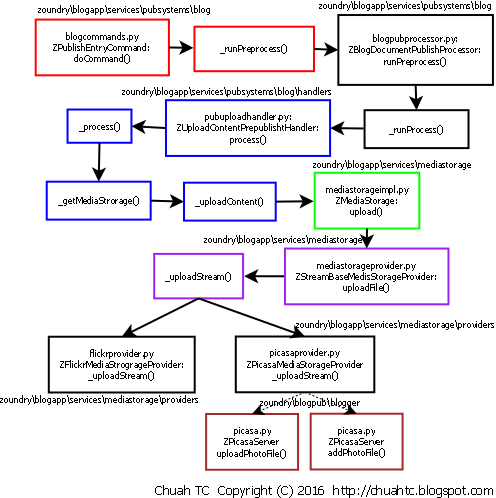
Going through the source code of a software application that was written by someone else is never easy. One could easily get lost and confused tracking through the code.
I can still remember the first time when I looked at the source code of Zoundry Raven. I couldn't make head or tail of what I was looking at then. But I persevered.
Having a map of the process flow of the various components of Raven/RavenPlus would be handy. But unfortunately, there was none. The only option left for me then is to draw one myself.
I know some of you have been waiting for this. So here it is: RavenPlus version 1.0.507, which contains the fix for uploading pictures to PicasaWeb via the Google OAuth2 protocol.
I have been testing this version out for over the last couple of weeks and I believe I have a stable version that is fit for release. Pictures in my last 3 blog postings (totalling 17 in all) were uploaded to PicasaWeb with this version and I did not notice anything out of the ordinary. They all went through smoothly as far as I could tell. Even my edited pictures were detected by RavenPlus and they got updated on PicasaWeb when I subsequently republish my blog post.
Not tested though is video uploads to PicasaWeb - simply because I do not have the bandwidth nor any videos to share.
If you do not upload pictures to PicasaWeb, you can safely ignore this version.
Version 1.0.507 only works for existing users of Raven and RavenPlus. New users will have to wait a little while as I haven't started work on making a clean import of blogs hosted on Google's Blogger/Blogspot yet. That's next on the to-do list.
I have a confession. I actually had the 'post scheduling' feature included in RavenPlus during development. But I had it removed a few days before releasing RavenPlus Version 1.0.505.
While under development, I noticed that one of my blog post had its URL set to my blog homepage. The reason (after much tracing): my PC was running about 60 seconds ahead of the Blogger/Blogspot server - it became a schedule post, which is technically correct. Because of this, I wrongly assumed that it was better to let Blogger/Blogspot set the publishing time of a blog post, rather than by RavenPlus, without realising that I had mistakenly taken the 'post scheduling' feature away.
I am now undoing my mistake with RavenPlus Version 1.0.506. My apologies.
I am releasing RavenPlus version 1.0.505 today. This release, although half-baked, is of special interest to existing users of Zoundry Raven and RavenPlus who are facing problems in publishing to Blogger/Blogspot. Google shutdown 'ClientLoging' completely in late May 2015, resulting in Raven and older versions of RavenPlus getting crippled.
At the moment, only the following Google OAuth2 aware publishing functions are available to users of Blogger/Blogspot:
If you blog on Google's Blogger/Blogspot, then read on.
Otherwise - users of Wordpress, for example - you have nothing to worry about. This blog post doesn't apply to you.
The 'Google OAuth2 authentication aware' version of RavenPlus, in which I am currently working on, is built using the Google's Blogger API version 3. As a consequence, to publish your blog post to Blogger/Blogspot with RavenPlus, you will need to do two things:
Sorry for the hassle, but Google's Terms Of Service doesn't allow me to share my "Client ID" and "Client Secret".
Here are some updates on what's happening on my work with RavenPlus and OAuth2 since my last update about 4 weeks ago.
I have completed the following functions in RavenPlus:
The time taken for item (4) is a little longer because I had to take a detour to learn about Python's 'list', 'tuple' and 'dictionary'. Otherwise I could not proceed. I never had to in my previous fixes as there wasn't a need to.
I was suppose to publish this post on 28th May 2015. Little did I know then that Google had planned to shutdown the ClientLogin authentication protocol on that faithful day. Obviously, my attempts to publish this blog post failed. If only they had published a notification on my Blogger dashboard (something that I login to everyday) rather then at their developer blogs and forums (something that I did not access until recently).
But irrespective, I still maintain that this is still the most difficult bug fix in Zoundry Raven/RavenPlus for me, despite my work on OAuth2 over the last couple of weeks.
The blog post follows below.
This must have been the most difficult bug fix for Zoundry Raven/RavenPlus so far. With variables to track and multiple levels of inheritance for certain Python Classes, pretty soon I got confused while tracing through the code. I have to virtually see the code in my sleep before I finally figured out the root cause of this problem: variables not being reset correctly after clicking the "Save" button within the editor. A very common programming mistake, if I may add.
I can only think of 2 states that the Raven/RavenPlus editor could be in at any one time - "Content NOT Modified" or "Content Modified". In the "Content NOT Modified" state, the "Save" button is disabled. Make any changes, by keying something on the keyboard for example, will change the editor from the "Content NOT Modified" to the "Content Modified" state. This should trigger an event to enable the "Save" button. Click on the "Save" button and the state will change back to "Content NOT Modified" from "Content Modified" - and disabling the "Save" button at the same time.
However, I have encountered a number of times when keying in something on the keyboard triggered nothing while editing. The "Save" button remains disabled no matter how many times I banged on the keyboard.
After working for something like 60 odd hours over some 20 odd days, I have finally managed to integrate Google's Blogger API Client for Python (version 3) into RavenPlus. Lots of pain; Lots of u-turns; Lots of challenges; And lots of stress along the way. This is something that I hope I will never have to do again.

I have to write 3 extra Python modules in all. These 3 modules are all to do with publishing to Google's Blogger with authentication via OAuth2, obviously. It is a good thing that Raven was well designed. Existing publishing modules (to Wordpress, for example) are not disturbed. It is a good thing too that there is a Python Client Libraries for Blogger API. Otherwise, there will be more work and complexity.

I thought I had found the last remaining oddity with the "Save" button in the Raven/RavenPlus editor 3 months ago. Unfortunately, I found another one recently.
I am a bit paranoid while composing my blog post. So, not wanting to lose my work, I have this habit of regularly saving my post after every couple of minutes while editing. I also have a need to dive into the "XHTML" tab from time to time; to insert an Amazon affiliate ad, for example. So this means me regularly switching between the "Design" and "XHTML" tabs while composing my blog post.
I got confused when I first encountered this flaw in Raven/RavenPlus: The "Save" button in the editor became enabled when I switched from the "Design" tab to the "XHTML" tab. It won't happen the first time round when I made the flip. But it definitely will from the second time onwards, even when there is NO content in either the "Design" or "XHTML" tab. This can't be right.
If you have been following my blog, you would have realised that I have made a couple of improvements and bug fixes to RavenPlus since the release of RavenPlus Version 1.0.503. After about a year, I think it is about time I release a new version of RavenPlus - Version 1.0.504 .
Dear ME,
I have noticed that you were struggling with yourself while trying to build the updated release of RavenPlus version 1.0.504 yesterday. RavenPlus version 1.0.503 was released roughly about a year ago, and it is quite obvious that you have forgotten the steps.
To prevent this from happening again, I have taken the liberty to write down and document the steps for you. Confucius say 
