
Someone mentioned that the photo uploads to Flickr from Raven+ is broken (here and here). Looks like it is not. Here is an excerpt from the log for this blog post for my Flickr upload for the picture above:
The following is from the OLW (Open Live Writer) Github support page dated Feb 13, 2019 by one danielpunkass.
Now, I haven't looked into the Google Photos term of service yet, so I am not too sure about the embedding-images bit. But judging by how Google is closing down is numerous software services over the last couple of years, it is not a bad idea, indeed prudent, to move away from the Blogger platform if your livelihood depends on it.
Have a read and see what you think. The problem with baseURL is valid, as mentioned in one of the links, by the way. It is only valid for 60 minutes after a picture upload (look under the heading 'Caching').
I thought I hit a dead-end when I couldn't find any Python API libraries for uploading my images to Google Photos via Raven+.
But a couple of hour search later via Google for "Google Photos Python Uploads" lead me to this:
There has been some problems with uploading images to PicasaWeb via Raven+ since January 23rd 2018. A peek into Raven+'s log says this:
[ZUploadContentPrePublishHandler] Failed to upload file 1 of 1 (F:\Temp\TEST_RAVEN.JPG)
[EXCEPTION][ZUploadContentPrePublishHandler] ZBlogAppException [Failed to upload file 'TEST_RAVEN.JPG'.([500, 'Internal Server Error', 'Internal error, try again later'])].
What does it mean? I am absolutely clueless.
Well anyway it seems to be fixed now - some 2 days later. I just managed to upload this picture a moment ago.

I'm not too sure what happened. I didn't change anything on my side, that's for sure. No official announcement from Google either.
Arrogance like Microsoft some 20 years ago? Or IBM some 30 to 40 years ago? Who knows?
I hope somebody will find this Python script useful. I actually used this Python script to test things out first (and make sure that everything works) before I started work on fixing RavenPlus last year. I can't remember now, but I think the gist of this script came off from b.py - a Python script for posting blog posts to Blogger and Wordpress.
To post to your blog from this script, remember to replace the blogID "1087XXX5764091XXX95" in the line
post = service.posts().insert(blogId="1087XXX5764091XXX95", body=body, isDraft=False).execute(credentials.authorize(Http()))
with your blog's blogID.
To update an existing blog post, just replace the line above with the following (NOTE: you will need to find out what your blog post postID is, otherwise the statement will fail):
post = service.posts().update(blogId="1087XXX5764091XXX95", postId="4781959859649019078", body=body, publish=True).execute(credentials.authorize(Http()))
The OAuth2 login credentials is named 'plus.dat' and it must be located in the same directory as this Python script file.
I ran this script file under Python 2.4 with some customisation made to the Google API Python Client Library Version 1.2.
Below is the code for my first Google OAuth2 Python program. The last time I had a look at it was something like 6 months ago - that long already? As I recall, the sample script file blogger.py that was bundled in 'google-api-python-client-samples-1.2.zip', if I am not mistaken, by Google didn't work. I had to debug it myself to get it working.
What this program does is to print out the user's Google login name, the list of blogs at Blogger.com that is associated with this account and the list of blog entries for each blog. The OAuth2 login credentials is named 'plus.dat' and it must be located in the same directory as this Python script file.
I ran this script file under Python 2.4 with some customisation made to the Google API Python Client Library Version 1.2.
I hope somebody will find this useful.
My Oh My. After put in so much time and effort into integrating Picasa and OAuth2 into RavenPlus, Google has now announced that it is shutting down PicasaWeb. May 1 2016 is the date to look out for as that is when Google will start rolling out the changes.
I have had a look at the PicasaWeb API developer page and it seems that pictures uploads via RavenPlus should work as what we have now in version 1.0.507. This is what the notice in this page says:

Looks okay to me. But who knows, Google has pulled the rug from right under our feet before.
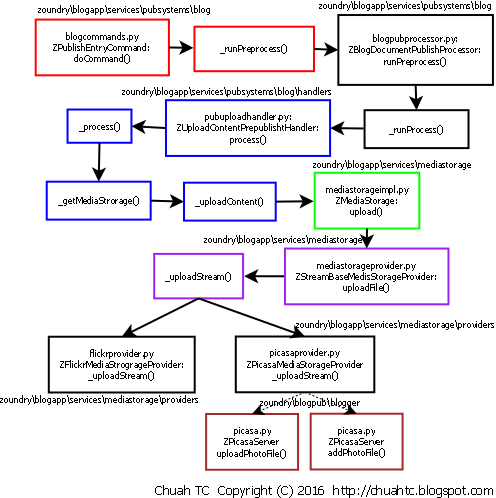
Going through the source code of a software application that was written by someone else is never easy. One could easily get lost and confused tracking through the code.
I can still remember the first time when I looked at the source code of Zoundry Raven. I couldn't make head or tail of what I was looking at then. But I persevered.
Having a map of the process flow of the various components of Raven/RavenPlus would be handy. But unfortunately, there was none. The only option left for me then is to draw one myself.


To say the least, I am struggling; struggling with XML processing in Python. All this while, I have been avoiding this subject area as it looks complicating. After spending a couple of days on this, it still is. I am not at all familiar with XML processing in Python or in any other computer programming language. There is a 357 pages book
The Google Picasa API part is easy, thanks to an example Python script that found off the Internet. In fact, I managed to upload a few pictures to Picasa web via my own customised Python script with OAuth2 authentication. The problem now is in saving the uploaded picture file's meta-data (the information that is returned from Picasa web) into RavenPlus. Not getting this meta-data into the RavenPlus' Picasa registry means RavenPlus is unaware of the successful picture upload.
I extended RavenPlus to support Google OAuth2 authentication for Blogger/Blogspot with the help of the Google API Client Library for Python version 1.2. Out of the box, this library does not support Python version 2.4, the version in which RavenPlus (and Raven) was built. Below are the modifications, in RED, that I have made to this library to get it working with version 2.4 of Python.
If you blog on Google's Blogger/Blogspot, then read on.
Otherwise - users of Wordpress, for example - you have nothing to worry about. This blog post doesn't apply to you.
The 'Google OAuth2 authentication aware' version of RavenPlus, in which I am currently working on, is built using the Google's Blogger API version 3. As a consequence, to publish your blog post to Blogger/Blogspot with RavenPlus, you will need to do two things:
Sorry for the hassle, but Google's Terms Of Service doesn't allow me to share my "Client ID" and "Client Secret".
Here are some updates on what's happening on my work with RavenPlus and OAuth2 since my last update about 4 weeks ago.
I have completed the following functions in RavenPlus:
The time taken for item (4) is a little longer because I had to take a detour to learn about Python's 'list', 'tuple' and 'dictionary'. Otherwise I could not proceed. I never had to in my previous fixes as there wasn't a need to.
After working for something like 60 odd hours over some 20 odd days, I have finally managed to integrate Google's Blogger API Client for Python (version 3) into RavenPlus. Lots of pain; Lots of u-turns; Lots of challenges; And lots of stress along the way. This is something that I hope I will never have to do again.

I have to write 3 extra Python modules in all. These 3 modules are all to do with publishing to Google's Blogger with authentication via OAuth2, obviously. It is a good thing that Raven was well designed. Existing publishing modules (to Wordpress, for example) are not disturbed. It is a good thing too that there is a Python Client Libraries for Blogger API. Otherwise, there will be more work and complexity.

Dear ME,
I have noticed that you were struggling with yourself while trying to build the updated release of RavenPlus version 1.0.504 yesterday. RavenPlus version 1.0.503 was released roughly about a year ago, and it is quite obvious that you have forgotten the steps.
To prevent this from happening again, I have taken the liberty to write down and document the steps for you. Confucius say 
It has been approximately a year since I started using Zoundry Raven. In my opinion, it is definitely the best offline blog editor that I have ever used. More recently, I have been customising Raven (which I now call RavenPlus) and tailoring it to meet my own needs. Hurray for making Raven open-source.
I still remember the quirkiness the first time I added a new "Category/Tag" (also called "Labels" on Google's Blogger) in Raven. Adding the "Category" is quite straight forward in the Raven editor - no problems there. After successfully publishing my post with the newly added "Category", everything looked to be in order when I viewed the blog post via a web browser.
I did not suspect anything amiss until a few days later when I tried to reuse the "Category" that I have added in Raven in another blog post. To my surprise, I could not find it in the list of "Categories" in the "Categories" tab, under the "Configure..." pull-down menu in the Raven's editor. But curiously, when I clicked on the "Tags" node on the "Account Navigator" sidebar, all "Categories" are listed, including the missing one.
Poking around, I later realised that for any "Category" that I have added via Raven, they are only available for use in the original blog post in which it was created. I was dumbfounded. Not surprisingly, this happens in RavenPlus too, since it shares almost 99.8% of the code with Raven.
But luckily I found something within Raven that can overcome the above mentioned shortcomings. I stumbled upon this discovery quite by accident actually, while going through Raven's log ("Tools -> Background Tasks" in the main window).

I never had this error message before. This only started happening about 2 weeks ago. A dialog box will appear as show above for my blog posts that contains Amazon Affiliate IFrame ads in RavenPlus. This error message will appear 'n' times if I have 'n' number of Amazon Affiliate IFrame Ads for any particular blog post. The Amazon ad still gets displayed correctly though, but this error message is annoying.
To prevent this error messages from popping up, what I did was to disable Javascript in Internet Explorer (IE). RavenPlus WYSIWYG editor is actually a Microsoft COM based object that is borrowed from IE and embedded into RavenPlus, by the way. To disable Javascript in IE:
I have made the switch to Zoundry Raven (or Raven) as my offline blog editor of choice. In fact, I have been composing and posting my blogs with Raven since 21st September 2013.
I was using Scribefire Classic (a version that is no longer supported) on Firefox version 3 previously. I have been happily using it for about 14 months until I had problems inserting "Amazon Affiliate iframe" ads. There were other minor limitations that I have encountered previously in Scribefire Classic but I have always been able to figure out a way round them. Unfortunately there is none that I could find with these "Amazon Affiliate iframe" ads. Upgrading to Scribefire Next/Chrome would be the most logical choice but regrettably there are just too many shortcomings with the later versions - and some are really odd ones. There have been no fixes and development to Scribefire since 2011. So Scribefire Next/Chrome is a no go for me.
Raven is not perfect either. Like Scribefire, it appears to have been abandoned and its support forum has gone offline. But luckily, Raven's code is available online as it is open-source. I have peeked at the code (I have a background in computing by the way) and found the Python code to be well designed, written and easy to follow - much better than Scribefire's. I do have to put in more effort at times as I am still new to the Python programming language. And I made my first fix about a month and a half ago.

I have to enable the "Remove Newlines" option, found in the "Account Manager" dialog box, when publishing my blog post to Blogger.com. If I do not, I will get double line spacing between paragraphs.
The offline blog editor Zoundry Raven self-terminates my Amazon Affiliate iframe tags. It converts my <iframe><iframe/> tags to <iframe/> upon publishing my blog posts. And my Amazon Ads do not get displayed correctly when viewed from the Opera web browser. I reported this issue at Zoundry Raven's Open Source website, but I received no reply. I tried accessing the Raven's support forum but it seems to have gone offline. So the only thing that I could do is to install the Raven's development environment, peek at its source code and try to fix this problem myself, if possible.
